
DEEP DIVE SERIES · #01
Let's build a home agent lab, junky style

Not just consuming AI. Building it. That’s the whole premise of this series, so let’s start where every real build starts: a laptop, a terminal, and way too many tabs open.
This first post is the lab setup. No theory, no slide decks, just the actual environment I’m running every future post in this series on top of. If you’re following along, get this working first. Everything after this assumes it’s here.
A quick naming note: Google rebranded Vertex AI to the Gemini Enterprise Agent Platform in 2026. This post uses the current name throughout, but package names like vertexai and API endpoints like aiplatform.googleapis.com didn’t change, so every command below is exactly what you’d still run today.
What we’re building
A local development environment where an agent runs entirely on your machine, but calls out to real Google Cloud infrastructure for the model, the logging, and eventually the deployment target. Locally you get a fast feedback loop. Remotely you get the actual Gemini models hosted on Google’s Gemini Enterprise Agent Platform and the services that make this production-shaped instead of toy-shaped.
The split looks like this:
- Local: Windows 11, the agent code, the tools it calls, a browser hitting a dev UI
- Remote: Gemini Enterprise Agent Platform (Gemini models), Cloud Storage, Secret Manager, Cloud Logging, IAM, all sitting in a single GCP project
Nothing here is exotic. That’s the point. If your lab is fragile, everything you build on top of it inherits that fragility.
Architecture Overview
LOCAL
Windows 11 machine
Browser
ADK Dev UI · 127.0.0.1:8080/dev-ui
ADK Web Server
Uvicorn
ReAct Agent + Tools
Gemini via Google Agent Platform
Python 3.11
managed with uv
GOOGLE CLOUD
agentic-ai-labs-502223
Gemini Enterprise Agent Platform
gemini-2.5-pro · gemini-2.0-flash
Cloud Storage + Secret Manager
artifacts & secrets
Cloud Logging + Monitoring
observability
IAM
permissions & service accounts
Future integrations
Want every wire and box? Here’s the full breakdown:
Enterprise Agent Platform
Full Architecture Reference
LOCAL DEVELOPMENT ENVIRONMENT
Windows 11 Machine
Developer Interface & Runtime
🌐 Web Browser
ADK Dev UI / Playground
http://127.0.0.1:8080/dev-ui/?app=app
🤖 ADK Web Server
adk web (Uvicorn)
127.0.0.1:8080
Agent Application
🧠 ReAct Agent
Gemini Model (via Gemini Enterprise Agent Platform)
🛠️ Tools (Local)
get_weather(query)
get_current_time(city)
(extendable)
Local Project
📁 enterprise-agent-platform/
app/ — agent code, tools, configs
deployment/ — Terraform, Cloud Build config
.env — local configuration
.venv — project virtual environment
README.md
🐍 Local Virtual Environment
Python 3.11 (uv managed)
Installed: google-adk, google-genai, vertexai, fastapi, etc.
Developer Tooling
🔒 Secure Connection
Secure Connection
HTTPS / gRPC
Authentication
ADC via Google Cloud SDK
Service Account
For deployments
Application Default Credentials
~/.config/gcloud/application_default_credentials.json
↕ APIs · Models · Tools · Data
GOOGLE CLOUD (REMOTE) ENVIRONMENT
Project: agentic-ai-labs-502223
Gemini Enterprise Agent Platform Services
✨ Gemini Models
gemini-2.5-pro
gemini-2.0-flash
(via global endpoint)
🔍 Search (formerly Vertex AI Search)
Vector Search
RAG
Data Connectors
🚀 Deployments (Deployment Target)
Managed Runtime
Scalability
Enterprise Ready
Additional Google Cloud Services
🗄️ Cloud Storage
Artifacts / Data
🔐 Secret Manager
Secrets
📜 Cloud Logging
Logs
📊 Cloud Monitoring
Metrics
🪪 IAM
Permissions
CI/CD & Infrastructure
🏗️ Cloud Build (CI/CD Runner)
Build
Test
Deploy
📦 Artifact Registry
Store Images
Versioning
Security
🌍 Terraform (via Cloud Build)
Provision
Infrastructure
Manage Lifecycle
Network & Security
🕸️ VPC
Networking
🛡️ Firewall Rules
Security
👤 Service Accounts
Identity
🧾 Audit Logs
Compliance
Project Configuration
- Project ID: agentic-ai-labs-502223
- Region: us-east1 (Infrastructure)
- Location: global (Gemini Models)
✅ APIs Enabled
- aiplatform.googleapis.com
- cloudbuild.googleapis.com
- artifactregistry.googleapis.com
- run.googleapis.com
- ...and other required APIs
Future Integrations
🔌 MCP Servers
Files, DB, APIs
🤝 A2A Protocol
Agent-to-Agent
☁️ External APIs
Third Party
🗃️ Enterprise Data
Databases, SaaS
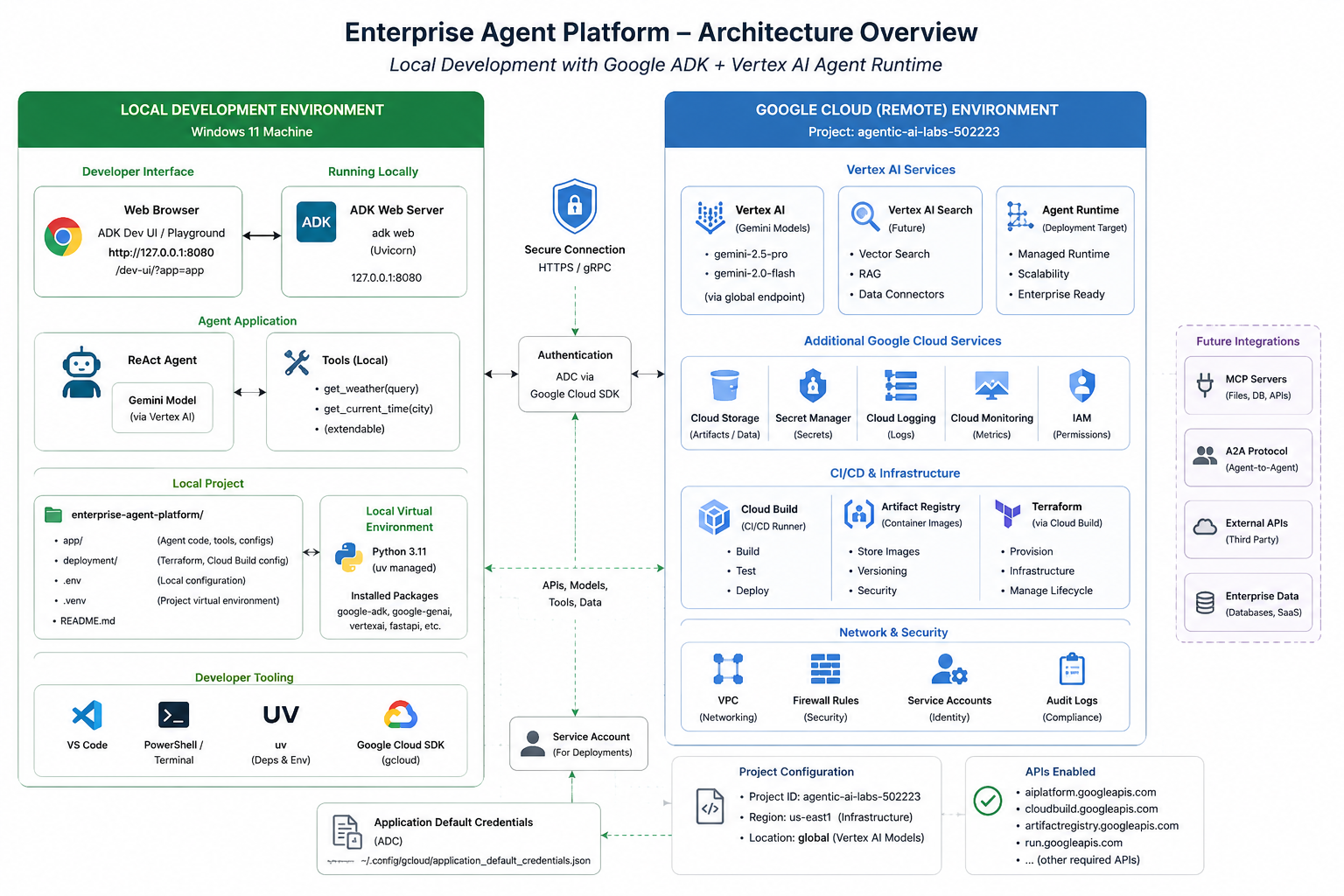
Original architecture reference, the one this whole build is based on (predates Google’s 2026 rename of Vertex AI to the Gemini Enterprise Agent Platform). Tap to view full size.
The stack
Here’s exactly what’s installed and why:
- Python 3.11, managed with
uvinstead of pip/venv directly for faster installs and dependency resolution that doesn’t quietly break every six months - google-adk: Google’s Agent Development Kit, the framework running the agent loop
- google-genai and vertexai: SDKs for talking to Gemini through Google’s Gemini Enterprise Agent Platform rather than the public Gemini API, since this is meant to look like an enterprise setup, not a hobby script (the
vertexaipackage name predates the platform’s 2026 rebrand, but it’s still the correct one to install) - fastapi: comes along for the ride with ADK’s dev server (see FastAPI documentation)
- Google Cloud SDK (
gcloud): for authentication, not for manually clicking through consoles - VS Code + PowerShell terminal: nothing unusual, just the daily driver
Project structure on disk:
enterprise-agent-platform/
├── app/            # agent code, tools, configs
├── deployment/     # Terraform, Cloud Build config
├── .env            # local configuration
├── .venv/          # project virtual environment
└── README.md
Keeping deployment/ in the repo from day one, even though there’s nothing to deploy yet, is deliberate. It means Terraform and CI/CD aren’t an afterthought bolted on in post six; they’re structural from the start.
Getting ADK running locally
The whole point of local dev here is speed: change code, see it run, without pushing to the cloud every time.
1. Authenticate to Google Cloud from your machine
gcloud auth application-default login
This drops Application Default Credentials at ~/.config/gcloud/application_default_credentials.json, which is what the SDKs pick up automatically, with no keys hardcoded anywhere and no service account JSON floating around in the repo.
2. Set the active project
gcloud config set project agentic-ai-labs-502223
(Yes, that’s a real project ID from my own setup; yours will be whatever you named it when you created the project in the console.)
3. Enable the APIs you’ll actually need
gcloud services enable aiplatform.googleapis.com
gcloud services enable cloudbuild.googleapis.com
gcloud services enable artifactregistry.googleapis.com
gcloud services enable run.googleapis.com
Skip this step and you’ll spend twenty minutes convinced your code is broken when it’s actually just a disabled API.
4. Install the project dependencies with uv
uv venv
uv pip install google-adk google-genai vertexai fastapi
5. Run the ADK dev server
adk web
This spins up a Uvicorn server at 127.0.0.1:8080, with a dev UI at /dev-ui/?app=app in your browser. That’s your playground: you edit the agent, refresh, and you’re talking to it through a real chat interface backed by a real Gemini model on Google’s Gemini Enterprise Agent Platform, not a mock.
The agent itself, for now
Nothing clever yet: a ReAct agent backed by a Gemini model, with two tools:
get_weather(query)get_current_time(city)
Request Flow
Browser
dev-ui
ADK Web Server
Uvicorn
ReAct Agent
Gemini · Google Agent Platform
Tools
get_weather · get_current_time
Tools loop back into the agent before the final response streams to the browser.
Deliberately boring. The goal of post one isn’t a smart agent, it’s a lab that doesn’t lie to you. Once the plumbing’s honest, every future post gets to focus entirely on the interesting part instead of fighting the environment.
What broke (and why that’s fine)
In the interest of “real projects, real insights” and not a highlight reel:
- First
adk webattempt failed silently because ADC hadn’t actually been picked up; it turned out to be a stale environment variable from an old project pointingGOOGLE_CLOUD_PROJECTsomewhere else. Worth checkingecho $env:GOOGLE_CLOUD_PROJECTin PowerShell before you assume the SDK is broken. - Forgot to enable
aiplatform.googleapis.comon a fresh project and got a permissions error that reads nothing like “you forgot to enable an API.” If Gemini Enterprise Agent Platform calls fail with vague auth errors, check enabled APIs before you check your credentials. uvoccasionally caches an old resolution if you change Python version mid-project: runuv venv --python 3.11explicitly, don’t assume it’ll pick up the right one from PATH.
None of this is exciting. All of it is exactly the kind of thing that eats an evening if nobody’s written it down. So it’s written down.
What’s next
Next post in the series goes deeper into ADK itself: how the agent loop actually works, how tools get registered, and where Deployments (formerly Vertex AI Agent Engine) comes in once you’re ready to stop running this locally and actually deploy it.
Build agents. Ship impact. Stay an AgentJunky.
Related Architecture Blueprints & Technical Guides
Chatbot vs Copilot vs Agent: The Plain-English Guide to What AI Actually Does
Before provisioning local agent infrastructure, understand the core taxonomy separating simple conversational wrappers from autonomous systems.
Speed vs Control vs Governance: Picking Your Agent-Building Path
Examine the four architectural trade-offs between rapid prototyping and long-term enterprise governance.
Giving the Agent Hands: Wiring Local MCP Servers with Python and SQLite
Connect your local laboratory agent to real databases using Anthropic's Model Context Protocol.
Engineering Reliable AI Agents: Tool Routing, Permissions and Evaluation
Implement permission barriers and deterministic tool routing to avoid agent execution loops.
Subscribe to The AgentJunky AI Brief
Get practical engineering thinking on AI storage fabrics, autonomous agents, Model Context Protocol, and sovereign infrastructure delivered straight to your LinkedIn feed.
Discuss an AI Opportunity
Need an architectural review, help transitioning an agent prototype to production, or designing governed tool gateways? Let's connect.